
Know your way around PowerPoint?
Wish you knew how to make graphics in PowerPoint?
If this is an app you own and use, it may be a great starting point for you to make your own graphics.
In this article you’ll learn:
- How to do graphic design in PowerPoint for blog and social media graphics.
- How to make a Facebook cover photo with PowerPoint template.
- How to create an infographic in PowerPoint from scratch or templates.
There are many better and easier options for you to use. Some are even free, or have a generous free plan.
They include a wide selection of design templates in pre-set sizes, so you’re not starting your graphic design from scratch.
These other apps usually provide a wide selection of free photos and fonts.
PowerPoint only offers a limited collection of photos, and no fonts. That’s fine if you wish to work with your own photos and fonts.
If that doesn’t sound good to you, choose a desktop or mobile app that provides templates, photos, and fonts for you. Check these out:
20+ EASY Ways to do Graphic Design on Desktop
Here Are the Best Mobile Apps to Add Text to Photos
Use PowerPoint to design for these reasons:
- You already own and are familiar with it.
- Set any graphic size and shape you want.
- Use any font on your computer.
- Free background graphics and textures.
- Insert free clip art right in the app.
- Size, crop, and do limited photo editing.
- Save your images at resolution you specify.
- Easy to make multiple, similar graphics from a template.
How to do graphic design in PowerPoint
If you’re still here, great! Let’s get started.
Step 1: Setup Your Page
 To start a graphic in PowerPoint without a template, you’ll need to do a little math. You need to convert pixels into inches.
We’re going to use 72 pixels per inch as our standard.
If you already know the pixel size you need, great! If not, check the Social Media Cheat Sheet to get the pixel dimensions for the image you want to create.
Then divide width and height by 72 to get the measurement in inches.
Create a New Presentation and set the Document Size under File > Page Setup.
You might get a warning that your size isn’t supported by your printer. That’s fine, since our graphics are for web use.
Just click OK and move on.

Step 2: Add Your Background
 Once you have a blank slide in the correct size, add your background image using Insert > Photo… from the menu.
Adjust the photo to fill your slide using the corner handles. Using top, bottom, or side handles will distort your photo.
You can temporarily adjust the photo’s transparency so you can see how to position it. Then click on the Crop tool and cut it down to your slide’s size.
Click outside the picture, and your cropping is complete.
If you prefer, you can choose one of PowerPoint’s backgrounds, textures, and patterns, or create a solid or gradient color.

 Step 3: Add Your Text
Now add your text as you normally do. You can add colored shapes to place your text on, if desired.
Don’t forget to add your name and/or website URL in small type. This way, if anyone “borrows” your graphic, it’s still attributed to you.
Step 4: Save as Pictures
 The important trick to know is how to save your graphic. Go to File > Save as Pictures. In the pop-up, choose to save as JPG or PNG. PNG gives you better quality but larger file size.
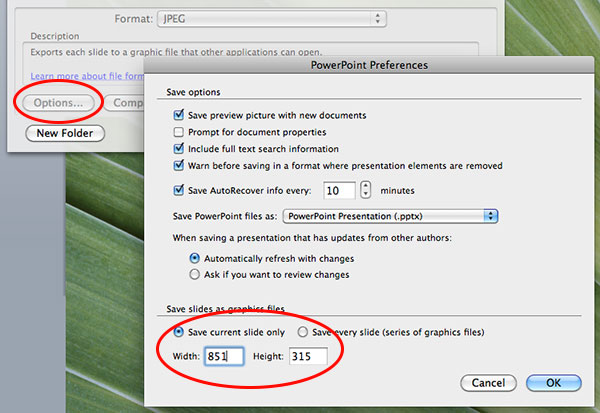
Now click the Options button. Be sure the pixel size is set to the size you got from the Social Media Cheat Sheet. Click OK and then Save.
Finally, be sure to save your file as a PPT or PPTX so you have an editable template to make variations on your graphic!
How to Create a Facebook Cover Photo in PowerPoint
This is even easier, because I’m giving you a PowerPoint Facebook cover template.
You just need to open the template. No fiddling to set the size!
NOTE that this template is for the Facebook business page cover photo.
If you need to make a cover photo for your personal profile, group, or event, check the Social Media Cheat Sheet to get the appropriate pixel dimensions, and follow instructions above.
Download the PowerPoint Facebook Page cover template here.
This template has been updated for 2020, and doesn’t match the screenshots below. The instructions are still correct though!
You’ll also need a great photo that expresses your business – one you’ve taken, have purchased as a stock photo, or have commercial rights to use.
Be sure to start with an image that’s at least 1200 pixels wide. You can reduce the size effectively, but enlarging it will reduce clarity and quality.
Step 1: Open template
Open the template in PowerPoint on your computer. It’s already the correct Facebook Page Cover Photo size.
Now, add your image using Insert > Photo… from the menu.
Adjust the photo to fit using the corner handles. Using top, bottom, or side handles will distort your photo.

Temporarily adjust transparency so you can see how to position your photo to avoid Facebook cropping out important elements on various devices. The template has these croppings marked for you.

Add type over your photo if you wish – but keep it simple for a more professional look.
Return to opaque when you’re satisfied.
Save by using File > Save as Pictures. Photos are usually best saved in JPEG format. Click the Options button, and at the bottom, choose Save current file only, and ensure it’s set at Width: 1200 and Height: 674.
You’re done! You made a perfectly sized Facebook Cover Photo with PowerPoint.
Creating Infographics with PowerPoint Templates
Thought about creating infographics – but it seems overwhelming?
Did you know you can make infographics with PowerPoint?
To make it even easier, you can use FREE infographic templates from Hubspot (signup required).
You’ll be creating infographics faster than you imagined with these PowerPoint templates.
Two important tips are:
Right clicking on any image, textbox, or shape will open up various options for you to change the appearance of the respective object—whether that be shading, colors, fills, outline, or styles. Be open to playing around seeing what you discover.
When inserting images for your graphic, you might find that the images have white backgrounds while your infographic does not. Either give the image a border, or use the transparent tool in your toolbar. Simply click “Transparent color,” and then click the background of your image.
Find the step-by-step instructions in the infographic at the end of this article!
Make PowerPoint Infographics From Scratch: Slides & Video
You can make a perfect Pinterest size PowerPoint infographic as a single slide.
Below is a SlideShare showing how to create one from scratch – in less than 30 minutes!
Credit: How I Created Easy Infographics Using MS PowerPoint from Kimberly Gauthier
Want to make taller infographics?
Watch this 10-minute video that goes into detail about making tall infographics from a number of PowerPoint slides, saved as .PNGs. Lots of great tips here!
What Do YOU Think about PowerPoint graphics?
If you’ve tried PowerPoint, or have another favorite design tool, I’d love to hear what you think!
Leave me a comment below about your experience with graphic design in PowerPoint.


Markela says
Thank you so much for the facebook cover template! It made creating my own fb cover photo so much faster and easier.
Louise Myers says
So glad to hear it!
Angela says
Louise, kudos for this wonderful info… I have had PP in my machines for years, and only recently discovered it was not just an office tool. Being a graphic designer myself, I have used PS E for a good while now, and of course like most, sits and waits for the software to “come up” which doesn’t make any quick fixes or creations easy, especially if your in a hurry. Lately I have gone a bit back to some roots, like publishing, and creating lists and journals, etc, not just single graphics anymore, and PP is the perfect tool, plus it comes up fast if your in a hurry.
There is still so much I have yet to learn about a tool that I have had for years lol, and have just now discovered. Not being an “office” type person myself, I would have never thought this software had any artistic capabilities, I was wrong 😉
Louise Myers says
It’s all in the person holding the mouse 😉
I’m so glad to hear you’re inspired to try something “new!”
Phoebe Moon says
Thank you so much for this! I have been having internet problems, so I struggle with online tools that help you make graphics. This is something I can do offline and the results are great! Thanks again.
Louise Myers says
So glad to hear it, Phoebe!
Anne says
These steps need some adjustment when making a graphic using Powerpoint on a Mac. I couldn’t figure out how to keep the size correct when exporting. I’m excited to figure this out as I love using Powerpoint.
Louise Myers says
Anne, I’d love to get your tips as you go along! The person who wrote this for me was on Mac I believe, but things change. I’ll double check on the export directions.
Anne says
Yes, lots of changes on Mac since 2015! I wish your writer would update the info.
Louise Myers says
Another reader had told me this was up to date but thanks for the heads up that it’s not! I’ll see what I can do.
Judy Nickles says
Where have you been all my (writing/social/media) life? Thank you, thank you, thank you!
So excited to try this…
Louise Myers says
Great, Judy! I hope it becomes your awesome new graphics tool. Enjoy!
Rick Noel says
Great post Louise! I love using PowerPoint for graphics. There are a great number of images in the clip art gallery which your PowerPoint license gives you right to use so you aren’t going to violate any copyrights using those online.
Louise Myers says
Rick,
That’s another great feature in PPT that I forgot to mention.
Thanks so much for your comment! I’m sorry for the extreme delay in replying – I just found a number of valid comments in my spam folder.
Justin says
Louise, great points about the benefits of using PowerPoint! I use PowerPoint for creating featured images for my blog posts, as well as creating video slides for my YouTube videos (e.g. title card, credits, end card).
Louise Myers says
Fantastic, Justin! So glad to hear PowerPoint is working for your graphics. Looking good!
Rosemary says
Louise, this was such a helpful lesson! Thanks so much. With so many tools (new and old) out there, I think we go searching for more when we actually already have what we need. Really great how-to. Appreciate it and shared!
Louise Myers says
Great! I’m glad it helped you out, and I appreciate the share, Rosemary!
Lorraine says
Louise, thanks for this “how to” posting … it’s really nice to be able to use PowerPoint this way — it’s so familiar to me for presentations, yet I’ve overlooked it as a ‘graphics’ tool. Excellent!
Louise Myers says
Lorraine,
Thanks for letting me know you found this info useful! Would love to see what you create.
Cheers!